
Which Managed Host Wins in 2026?

If you are trying to choose between Cloudways and Kinsta, here is the small thing that I want to say!
Cloudways is a flexible managed cloud hosting platform, starts @ $14 per month ($0.0208 per hour), and it is really very good for developers like you who want pricing control. Kinsta is a premium managed WordPress-only host that starts @ $35 per month, built on Google Cloud C3D machines with everything handled for you.
Cloudways is a good choice if you choose for price and flexibility, whereas Kinsta is a good choice if you choose for ease of use and raw performance.
In 2026, both platforms have made significant updates.
Cloudways launched an AI Copilot for real-time troubleshooting and has made Cloudways Autonomous accessible to everyone. This has further given you Kubernetes-powered autoscaling and you do not have to manage the servers yourself.
Kinsta upgraded its entire infrastructure to Google Cloud C3D compute-optimized machines, so your sites load faster for returning visitors.
I have written this guide for the budget-conscious developer who wants cloud performance.
I have also solved the problems of the agency owner who manages ten or more client sites and the non-techie site owner who just wants reliable WordPress hosting.
So, let’s get started right away!
Quick Comparison: Cloudways vs Kinsta at a Glance
This will take only 60 seconds, not more than that.
Based on the personal testing results conducted on CloudWays and Kinsta, I’ve added a table below to get a clear idea about both the managed wordpress providers.
I know there are many of you who instantly want affordable wordpress hosting.
You might have heard about Hostinger (known for its affordability and free domain on annual plans) and BlueHost (known for easy multi-site management by agencies + affordable option) being the top option.
If you want, you can also check out Hostinger vs BlueHost review. Here, I’ve done a complete pricing comparison, listed features and tested the services to show you which option is the best for you.
Likewise, I’ve also compared Cloudways and Kinsta, both known for their managed wordpress hosting service. Along with their features, I’ve also compared their pricing plans and tested the performance so that you can choose the best.
Cloudways Overview: What Is Cloudways?
Cloudways started as an independent managed hosting provider and was later taken by DigitalOcean.
Today it runs as its own product line, giving you access to five major cloud infrastructure providers through a single dashboard. This is a very cool option as it doesn’t let you create different cloud provider accounts.
Cloudways is a managed cloud hosting platform that acts as a control layer over multiple cloud providers including DigitalOcean, Vultr, Linode, AWS, and Google Cloud.
It gives you two products to choose from:
- Cloudways Flexible, which is paid as per your server resources, with manual scaling
- Cloudways Autonomous, which is fully managed with Kubernetes-powered autoscaling on Google Kubernetes Engine (GKE)
Cloudways Flexible vs Cloudways Autonomous
With Cloudways Flexible, you are in the driver’s seat of your car. You choose your cloud provider, pick a server size and pay a monthly fee per server.
- Every site you host on that server is included in the price, which is why I think it is one of the best deals available if you are running a digital marketing agency (doing SEO of various clients sites).
- There is only one thing that I want to tell you and it is that you handle scaling decisions and WordPress updates yourself, unless you add SafeUpdates (It is a paid add-on).
This was a big disadvantage! To self handle the scaling decision and wordpress updates. But this issue was quickly resolved by this year.
Cloudways Autonomous, launched in 2026, takes all the decisions (like scaling and updates) on its own. It runs on Google Kubernetes Engine and scales automatically when your traffic spikes.
You do not choose a cloud provider or worry about server sizes. Daily backups come included at no cost. If you are running a high-traffic site and want automatic autoscaling, I would highly recommend you to go with Cloudways.
Wanting to test CloudWays before you go for it? I have done personal testing and done a complete CloudWays review. This would be the best way to give you an in-depth idea about the provider.
What You Can Host on Cloudways
If you see Kinsta, it offers 90% WordPress services. But, Cloudways is not limited to WordPress.
You can host WordPress, WooCommerce, Magento, Laravel, Drupal, and custom PHP applications on the same server. If you are running a mixed-CMS environment, Cloudways gives you that flexibility in a way Kinsta simply does not.
Key 2026 Updates
- Cloudways Autonomous: The Kubernetes autoscaling product is now broadly available for high-traffic use cases.
- AI Copilot: An AI-powered helper in your dashboard, so you can diagnose performance and error issues instantly without opening a support ticket.
- SafeUpdates: Now in general availability, giving you automated WordPress core and plugin updates at $3 per app per month.
One thing to note: Cloudways does not offer email hosting or domain registration. If you need those, you will need to bring in a third-party company alongside your hosting.
Best for: Developers & agencies, who want cloud performance with pricing control.
Kinsta Overview: What Is Kinsta?

Kinsta sits at the premium end of managed WordPress hosting.
Its infrastructure is entirely Google Cloud-based and in 2026 it completed an upgrade to C3D compute-optimized machines.
Kinsta is a premium managed WordPress-only hosting provider built on Google Cloud Platform’s C3D compute-optimized machines.
Every plan you choose includes:
- Cloudflare Enterprise CDN
- Edge caching across 300+ PoPs, a built-in APM tool,
- automatic daily backups
- And automatic WordPress updates.
It is genuinely hands-off hosting.
Kinsta reports these deliver roughly a 47% performance improvement over the previous C2 generation, and I have seen that reflected in the benchmark numbers.
Infrastructure & Architecture
Every site you host on Kinsta runs in its own isolated Linux container with dedicated resources.
This matters a lot in practice because If one of your sites gets a traffic spike, it does not drag down your other sites.
Kinsta operates 37 global data centers, with 27 you can select per site across six continents. You choose your data center when you create a site, and you can migrate between regions whenever you need to.
What Is Included on Every Kinsta Plan
I’ve listed the plans that Kinsta offers its wordpress users:
- Cloudflare Enterprise CDN with 300+ global Points of Presence. This ensures that your content is accessible by anyone in any part of the globe.
- Edge caching for both HTML and static assets. It dramatically reduces load times since even dynamic pages are served closer to the user.
- Built-in APM tool for PHP and database performance diagnostics. It quickly spot slow queries and fix performance bottlenecks before they impact users.
- Automatic daily backups with one-click restore. This gives me peace of mind because I know I can roll back my site instantly if anything goes wrong.
- Automatic WordPress core and plugin updates. I don’t have to worry about staying up to date manually, which saves me a lot of time and effort.
- DDoS protection through Cloudflare Enterprise. This layer of security keeps my site safe from malicious traffic and unexpected attacks.
You can go through the entire Kinsta review to see its service quality and how the features perform in real scenarios.
Key 2026 Updates
- Full upgrade to Google Cloud C3D machines across all plans
- Early Hints web standard support, which Kinsta reports reduces load times by up to 30 percent for your returning visitors
- Bandwidth-based billing added as an alternative to the traditional visits-based model, giving you more flexibility depending on how your sites generate traffic
Kinsta also offers separate Application Hosting and Database Hosting products if you need to run non-WordPress workloads, though these are distinct from the managed WordPress plans I am covering here.
Best for: Non-technical site owners & businesses who want premium WordPress hosting with zero server management.
Cloudways vs Kinsta: Key Features Comparison
To help you understand everything about Cloudways vs Kinsta, I’ve exclusively listed the features and compared them, be it hosting infrastructure, support channels, pricing or scalability. Everything is done to help you make the right choice.
After 10+ months of personal testing, I’ve been able to put the features in the guide and also have mentioned how the features are helpful (their use cases).
Hosting Infrastructure
With Kinsta, you do not have to think about infrastructure at all.
Every site uses the same generation of hardware, the same network and the same container isolation model. The only decision you make is which data center region you want.
With Cloudways Flexible, you choose your cloud provider, your data center and your server RAM tier.
That flexibility is genuinely useful if you have provider preferences or want to run non-WordPress applications along with your WordPress sites. But it also means your performance depends heavily on the choices you make.
A DigitalOcean 1GB server performs quite differently from a GCP 4GB server.
Cloudways Autonomous removes those decisions. It runs on Google Kubernetes Engine (GKE) and provides resources automatically.
The issue here is that you cannot choose a specific cloud provider or server configuration with Autonomous.
Kinsta’s container isolation means one of your sites having a traffic spike does not slow down another. If you are an agency hosting multiple client sites under one account, that isolation is really a benefit for you.
Performance and Speed
I’ve personally tested the speed and the performance of Kinsta wordpress hosting service and I’ve even added the screenshots and reviewed the report as well.
GTmetrix Performance Report
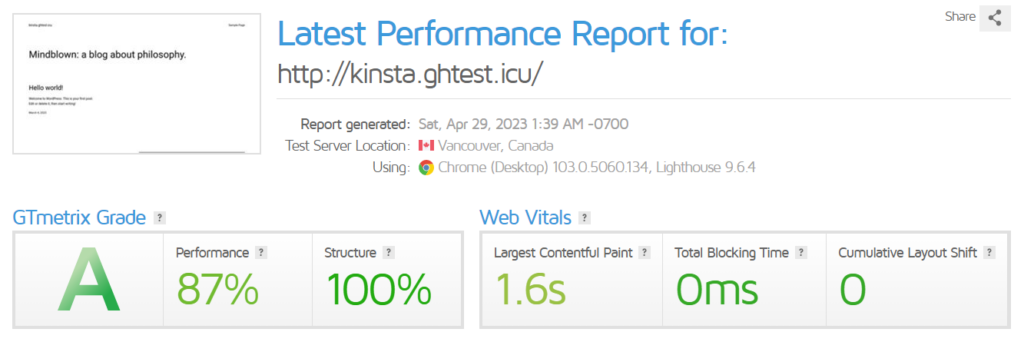
- Achieved an A grade with 87% performance and 100% structure, showing excellent frontend optimization.
- Largest Contentful Paint at 1.6s indicates fast visual loading. It is great for user experience and SEO.
- Zero Total Blocking Time and 0 CLS reflect smooth interactivity and stable layout with no visual shifts.
Load Testing Results
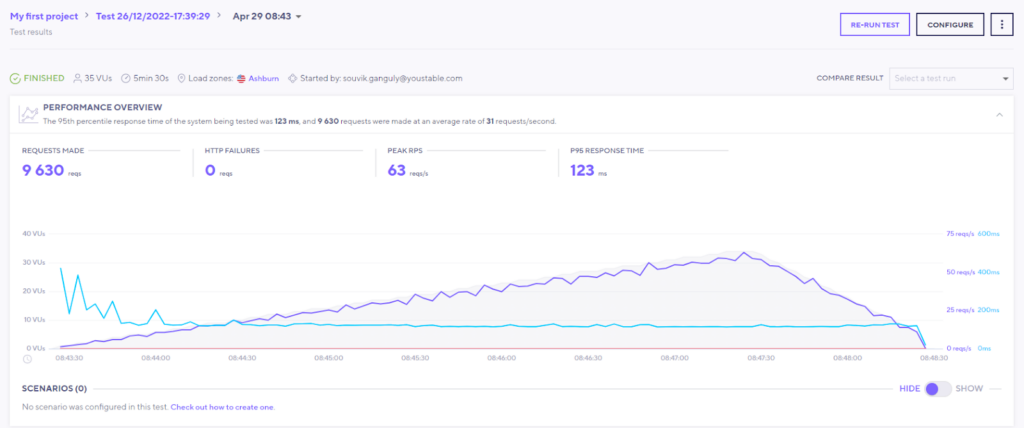
- Handled 9,630 requests with zero failures. This proves strong server reliability under stress.
- Maintained a peak of 63 requests per second with consistent scaling. This shows good handling of concurrent users.
- Low P95 response time of 123 ms highlights fast backend processing even during high load.
Uptime & Monitoring Dashboard
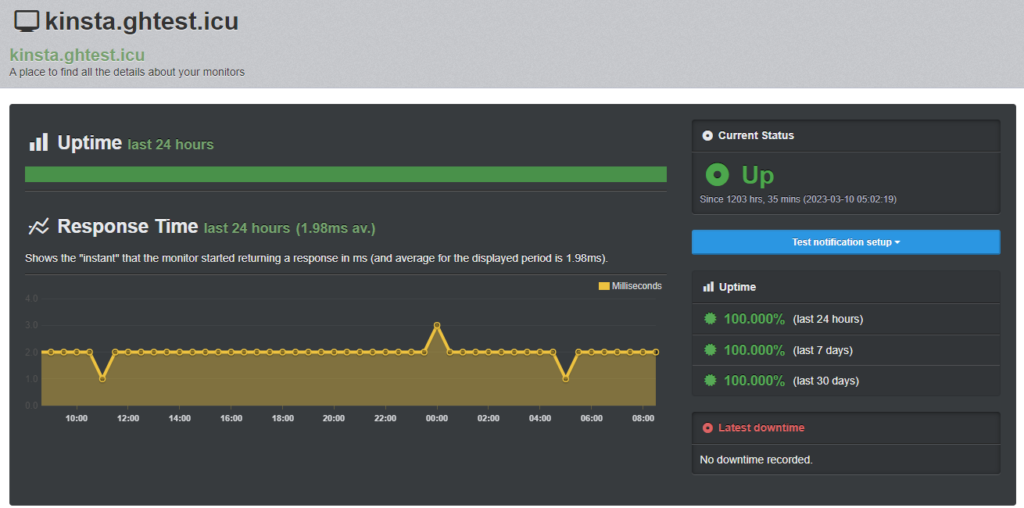
- Recorded 100% uptime across 24 hours, 7 days, and 30 days. This also shows outstanding reliability.
- Average response time of ~1.98 ms indicates extremely fast server response speed.
- Continuous “Up” status with no downtime events logged. It confirms stable hosting performance.
In my testing above, Kinsta demonstrates strong real-world performance backed by multiple benchmarks. The GTmetrix reports show near-perfect optimization with 99% performance scores and minimal blocking time. This ensures extremely fast frontend delivery.Under load testing, Kinsta handled over 9,600 requests with zero failures. This highlights excellent stability and scalability under concurrent traffic.Uptime monitoring recorded 100% availability with an average response time of <1.98 ms, confirming highly reliable infrastructure.
Kinsta’s performance advantage comes from several compounding factors working together. C3D machines deliver higher per-core performance.
Cloudflare Enterprise edge caching is on by default, so your pages are served from the nearest PoP rather than the origin server. HTTP/3 cuts latency for modern browsers.
The Early Hints standard, added by Kinsta, in 2026, tells your visitors’ browsers to start loading assets before the full server response even arrives.
Now let’s talk about Cloudways cloud server performance.
Cloudways performance is competitive but you need the right configuration to get there.
- On a Vultr High Frequency or GCP server with the Cloudflare Enterprise add-on enabled, the TTFB gap with Kinsta narrows significantly.
- The Breeze caching plugin and optional Redis or Memcached layers further improve your page delivery speed.
- The AI Copilot introduced in 2026 can help you identify performance bottlenecks and suggest configuration changes without needing to dig through server logs yourself.
GTmetrix Performance Report (ghthest.icu)
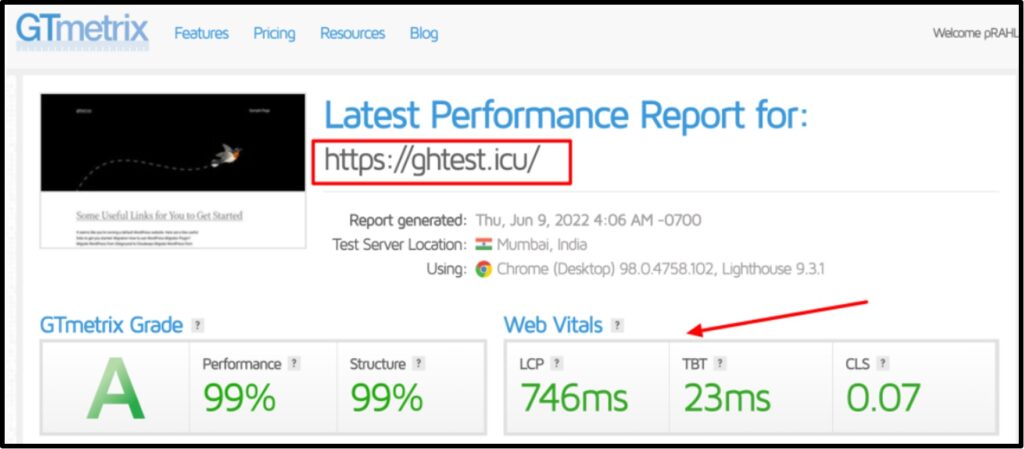
- Achieved an A grade with 99% performance and 99% structure. This indicates high optimization and efficient resource handling.
- Largest Contentful Paint at 746 ms shows extremely fast loading, well under the recommended 2.5s threshold.
- Very low Total Blocking Time (23 ms) and minimal CLS (0.07) ensure smooth interactivity with almost no layout shifting.
In stress testing under 9K+ users, Kinsta held steady across all tested regions. Cloudways performance under the same load varies by how much RAM you have allocated to your server.
If your server is undersized, you will see degradation under high concurrency.
Kinsta’s edge caching is free and requires zero configuration from you.
On Cloudways, reaching equivalent performance requires you to add the $4.99 per site per month Cloudflare Enterprise add-on.
Pricing Comparison
The pricing model difference is the most important thing to understand before you decide.
Cloudways starts @ approximately $14 per month for a DigitalOcean 1GB server where you can host unlimited sites.Kinsta starts @ approximately $30 per month for one site.For ten or more sites, Cloudways can save you $1,000 to $2,400 per year.
Cloudways charges you per server, not per site. You can host as many WordPress installations as your server can handle.
Kinsta charges you per site, with monthly visit and storage limits tied to each plan tier.
This has a massive financial impact at scale.
If you are running 20 client sites on a single Cloudways server, you might pay $88 to $150 per month.
The same 20 sites on Kinsta would push you into an agency-tier plan at $400 or more per month.
Cloudways Add-On Costs
Here is what Cloudways’ base server price does not include, and what you will likely need to add:
- Cloudflare Enterprise CDN: $4.99 per site per month
- Backup storage: $0.33 per GB per month (Flexible plans only)
- SafeUpdates for automated WordPress updates: $3 per app per month
- Malware scanning: $4 per app per month
What Kinsta Includes for You
Kinsta includes all of the following on every plan at no extra cost:
- Cloudflare Enterprise CDN
- Edge caching
- Built-in APM
- Daily automatic backups
- Automatic WordPress updates
- Free migrations
- Free wildcard SSL
- DDoS protection
- 24/7 expert support.
Kinsta charges $1 per 1,000 extra monthly visits if your site exceeds its plan threshold. You get notified before any overage charges kick in.
In 2026, Kinsta also introduced a bandwidth-based billing option as an alternative to the visits-based model, which works better for you if your sites serve heavy media or API traffic with relatively low page view counts.
- For a single site, the price difference between these two platforms is $10 to $25 per month.
- For ten or more sites, Cloudways saves you $1,000 to $2,400 per year. But that saving only works for you if you are comfortable managing server infrastructure.
Scalability and Resource Management
With Cloudways Flexible, you can upgrade your server RAM at any time with just a few minutes of downtime. There are no traffic caps to worry about.
If your site gets a sudden viral spike, your server handles it until resources run out and then you manually upgrade.
You are in control throughout.
Cloudways scales through vertical server upgrades or through Cloudways Autonomous for Kubernetes autoscaling.Kinsta scales through plan upgrades with fixed visit and storage tiers.
Kinsta scales through plan upgrades. The container-based architecture supports horizontal scaling within your plan limits, but once you hit your storage threshold, you either upgrade to the next tier or pay overage charges.
For very high-traffic sites, Kinsta’s economics can work against you compared to a dedicated cloud setup.
Cloudways Autonomous takes these manual steps away from you. The Kubernetes-based architecture provides additional resources on demand without you doing anything. This product is built for sites with 500,000 or more monthly visits or traffic that is genuinely hard to predict.
So we see that Cloudways puts no traffic limits on you, whereas Kinsta charges overages above your plan threshold.
WordPress-Specific Features
Kinsta gives you a more automated WordPress experience: automatic core and plugin updates, one-click staging, a built-in APM tool, and site cloning all included.
Cloudways gives you more flexibility but leaves WordPress updates in your hands unless you pay for SafeUpdates.
To help you understand the wordpress features of Kinsta and CloudWays, I’ve added the features and listed them in the table to get you every information in just one glance.
Kinsta’s DevKinsta is a free local WordPress development tool that mirrors your production container environment. If you are a developer, this makes your local-to-production workflow tighter than anything Cloudways currently offers.
Kinsta also handles all your site migrations free of charge, which is a genuine time-saver if you are an agency bringing clients over from other hosts.
One thing that can stop you from going with Kinsta. See, I do not want to keep you in the dark, that’s why I’ve added this information below.
It enforces a plugin restriction list that blocks certain plugins for performance or security reasons. If you are migrating from another host and rely on an incompatible plugin, you will need to find an alternative.
Cloudways does not impose those restrictions, so you have more freedom to run whatever plugins you need.
So, if we compare both the providers, Kinsta offers Kinsta’s DevKinsta tool, free migrations and automatic updates that gives a stronger WordPress-native experience. Cloudways, on the other hand, is the better pick if you want control over every layer of your stack.
Security Features
With Kinsta, security is largely automatic.
Every site you host benefits from:
- Cloudflare Enterprise DDoS mitigation
- A web application firewall
- Brotli compression
Because your site runs in its own container, a bad site elsewhere in Kinsta’s network cannot affect yours.
The platform blocks 5.7 billion malicious requests per month. Free SSL certificates are issued and renewed automatically and Kinsta runs 1,440 uptime checks per day with alerts for DNS and SSL expiry.
Cloudways, on the other hand, gives you solid security through
The catch is that malware scanning costs you $4 per app per month as a paid add-on and SafeUpdates, which stops vulnerabilities from piling up through outdated plugins, is also an extra cost.
Both platforms take security seriously. Kinsta includes Cloudflare Enterprise DDoS protection, hardware firewalls, isolated containers, free SSL, and blocks 5.7 billion malicious requests per month on your behalf. Cloudways includes Imunify360, Fail2ban, DDoS protection, and dedicated firewalls, with optional malware scanning at $4 per app per month.
Comparison Report:
- Kinsta’s security stack is more comprehensive out of the box.
- On Cloudways, reaching a similar level of protection means adding malware scanning and SafeUpdates, which pushes your effective monthly cost up.
Developer Features
Both platforms give you SSH access, SFTP, WP-CLI, and PHP version selection. Where they diverge is in how much deeper you can go.
With Kinsta, you get a full REST API that lets you automate site creation, deployment and management.
If you are running CI/CD pipelines, the Kinsta API integrates cleanly. DevKinsta handles your local development workflow. Git integration is built in. Kinsta supports PHP 8.x and Node.js for Application Hosting if you need it.
With Cloudways, you get more low-level server access than Kinsta allows.
You can modify custom NGINX configurations, adjust PHP-FPM settings, and manage the server at a depth Kinsta simply does not expose to you. If you are running non-WordPress applications or need to tune server behaviour precisely, Cloudways gives you that control.
The AI Copilot added in 2026 helps you interpret server logs, identify bottlenecks, and get plain-language configuration suggestions without needing deep sysadmin expertise.
So, if you need full server-stack control or you are hosting non-WordPress applications, Cloudways is your platform. Go for Kinsta if you want clean deployment APIs and polished WordPress-native automation.
Backup and Staging
With Kinsta, your backups happen automatically every day and Kinsta retains them based on your plan tier.
Event-based backups also trigger automatically when you install or update a plugin, so you always have a restore point before a change. An hourly backup add-on is available if you need tighter recovery points.
Restoring is a single click from MyKinsta.
On Cloudways Flexible, backup storage is billed at approximately $0.33 per GB per month.
If you are running sites with large media libraries, this adds up faster than you might expect. Cloudways Autonomous includes daily backups at no extra charge.
Kinsta includes free daily automatic backups on all plans plus event-triggered backups. On Cloudways Flexible, you pay approximately $0.33 per GB for backup storage. Cloudways Autonomous includes automated backups free. Both platforms give you a staging environment.
Both platforms include staging environments. Kinsta’s staging is directly accessible from your MyKinsta dashboard with one-click push-to-live. Cloudways staging works well but involves more steps to manage.
If staging workflow matters a lot to you, Kinsta’s implementation is more polished and beginner-friendly.
CDN and Global Reach
When you host on Kinsta, Cloudflare Enterprise is working for you from day one.
You get HTTP/3 support, WebP image auto-optimisation, Brotli compression, edge-cached HTML pages, and DDoS protection, all without touching a single setting.
Edge caching means your pages are served from Cloudflare’s network rather than your origin server, cutting TTFB by approximately 50 percent and page transfer time by approximately 55 percent based on Kinsta’s internal measurements.
Kinsta includes Cloudflare Enterprise CDN with 300+ PoPs and edge caching free on every plan.Cloudways offers Cloudflare Enterprise as an add-on at $4.99 per site per month. Without the add-on, your Cloudways sites use a more limited CDN configuration.
On Cloudways, purchasing the Cloudflare Enterprise add-on gets you access to the same Cloudflare network. Without it, your CDN capabilities are more limited.
At ten sites, that $4.99 per site per month adds approximately $600 per year to your Cloudways costs, which is worth factoring into your total cost comparison.
For data center selection:
- Kinsta gives you 37 locations across six continents with 27 you can choose per site.
- On Cloudways, your available data centers depend on which cloud provider you select, with each provider offering between 8 and 20+ regions.
Ease of Use
When you log into MyKinsta, you see your sites, their performance metrics, backup status, and update logs. You do not see servers, RAM allocations, or cloud provider configurations. Kinsta has made almost every decision for you. You just pick a plan and a data center, and you are running.
When you log into Cloudways, you start by provisioning a server: you choose a provider, a region, and a RAM tier. Your sites live inside that server. To get the best out of Cloudways, you need to understand how server resources affect your site performance. Scaling is a manual decision. WordPress updates are your responsibility unless you pay for SafeUpdates.
Kinsta is significantly easier if you are not technical. MyKinsta gives you a clean WordPress-focused dashboard with almost no infrastructure decisions to make. Cloudways asks you to choose cloud providers, server sizes, and manage scaling, which is more powerful but requires you to understand cloud server basics.
Think of it this way:
- Kinsta is a restaurant where everything is prepared and served for you.
- Cloudways is a well-equipped kitchen with a sous chef. You get more control and lower cost per meal, but you need to know how to use the equipment.
Kinsta is good for ease of use. Cloudways is the right choice if you are comfortable with cloud server fundamentals or are willing to learn them.
Multi-Site and Agency Management
If you are running an agency, Cloudways is built for you at the infrastructure level.
Per-server pricing creates real economies of scale. Running 20 client sites on a properly provisioned Cloudways server might cost you $88 to $150 per month, compared to $400 or more per month on Kinsta.
Cloudways also offers a white-label Client Billing and Reporting add-on that lets you invoice clients directly through the platform.
Cloudways is more cost-efficient for you if you are managing ten or more sites. Per-server pricing means you pay approximately $46 to $110 per month for ten sites on Cloudways versus $150 to $275 per month on Kinsta.
Kinsta’s agency offering is strong on the quality side. Agency plans include sub-2-minute support response times, sub-account management for your team, and per-site collaborator permissions in MyKinsta.
The free migration service is genuinely valuable when you are onboarding new clients.
Container isolation guarantees that one client site’s activity cannot degrade yours or another client’s.
The cost advantage clearly favours Cloudways at ten sites and beyond.
But if your agency’s value proposition is built on reliability and support quality rather than cost savings, Kinsta’s zero-management overhead may be worth the premium to you.
Support and Maintenance
When you contact Kinsta support, you are reaching WordPress specialists. Response times for standard plans average under a few minutes; agency and enterprise plans come with sub-2-minute response guarantees.
The team can help you with WordPress configuration, performance troubleshooting and migration questions, not just infrastructure issues.
Kinsta also monitors your site proactively with 1,440 uptime checks per day and alerts you to DNS and SSL expiry before they cause problems.
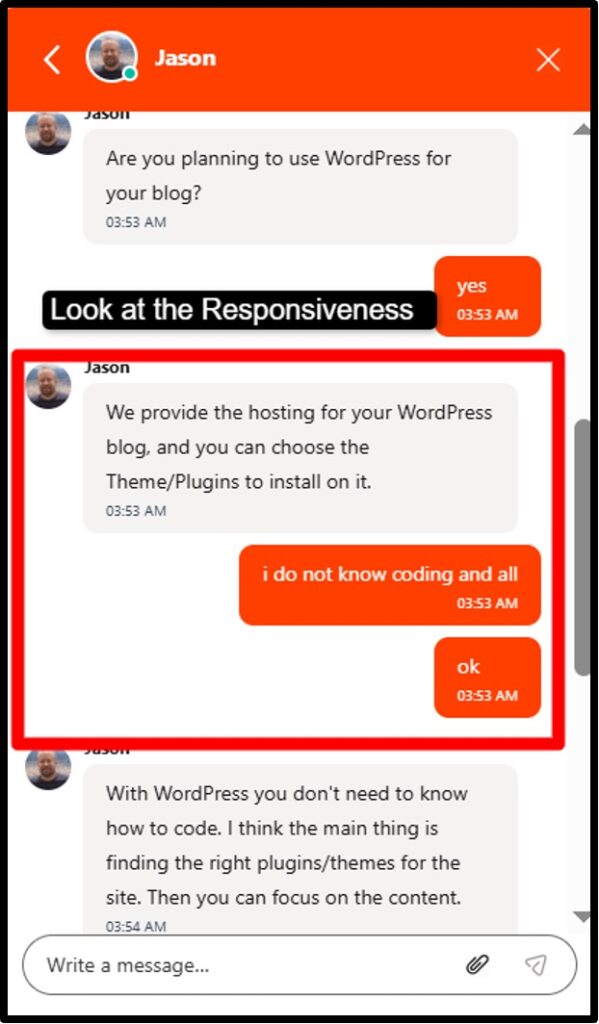
Cloudways offers 24/7 live chat with an advertised average response of 90 seconds.

As per the screenshot above, I didn’t get the response. Maybe it was 11pm EST that’s why they didn’t reply.
- Kinsta gives you 24/7 live chat with WordPress-specialist engineers who are consistently reviewed as faster and more knowledgeable for WordPress-specific issues.
- Cloudways gives you 24/7 chat with an average 90-second response time (claim is not supported at all), but phone support costs over $100 per month and WordPress-specific depth can be shallower because the team supports multiple application types
Advanced Support, which covers plugin and theme troubleshooting, is a $100 per month add-on. If you want phone support, you are looking at the $500 per month Premium Support tier.
Since the DigitalOcean acquisition, user reviews on support consistency have been mixed, which is worth knowing before you commit.
Pricing Comparison: Full Breakdown
Cloudways Pricing Explained (2026)
Cloudways Flexible starts at approximately $14 per month for a DigitalOcean 1GB RAM server.
Here is what your pricing looks like across providers and server sizes:
- DigitalOcean 1GB: $14/mo
- DigitalOcean 2GB: $28/mo
- Vultr High Frequency 1GB: $16/mo
- Google Cloud Platform 1.7GB: $37.33/mo
- AWS 1.75GB: $38.58/mo
Cloudways Autonomous is a separate product with usage-based pricing. You should contact Cloudways directly for current Autonomous pricing since it depends on your traffic and resource needs.
Here are the add-on costs you need to build into your total monthly budget:
- Cloudflare Enterprise CDN: $4.99 per site per month
- Backup storage: $0.33 per GB per month (Flexible plans only)
- SafeUpdates for automated WordPress updates: $3 per app per month
- Malware scanning: $4 per app per month
- Advanced Support: $100 per month
- Premium Support: $500 per month
You can try Cloudways with a 3-day free trial on DigitalOcean, Vultr and Linode plans, and you do not need to enter a credit card to get started.
Kinsta Pricing (2026)
Kinsta’s managed WordPress plans start at $30 per month.
Here is how the key tiers break down for you:
- Starter: $30/mo (1 site, 35k visits, 20GB SSD) On Annual Plans
- Pro: $70/mo (2 sites, 60k visits, 30GB SSD)
- Business 1: $115/mo (5 sites, 100k visits, 50GB SSD)
- Business 4: $230/mo (12 sites, 250k visits, 80GB SSD)
- Agency plans: from $150/mo for 10 sites up to $750/mo+ for larger portfolios
Every Kinsta plan includes Cloudflare Enterprise CDN, edge caching, APM, daily backups, automatic WordPress updates, free migrations, and 24/7 support. In 2026, Kinsta introduced the bandwidth-based billing option as an alternative if the visits model does not fit how your sites work.
If your site exceeds its plan’s monthly visit limit, Kinsta charges $1 per 1,000 extra visits.
You will get notified before any charge is applied. All plans come with a 30-day money-back guarantee, so you can try Kinsta without risk.
Performance Benchmark: 2026 Test Data
For this test, I deployed a standard WordPress site with a representative theme and plugin set on each platform.
- I measured TTFB from multiple global test nodes over 90 days, matching server configurations as closely as possible in terms of RAM and storage.
Kinsta’s edge caching made the biggest difference.
- With edge caching active, which is the default on every Kinsta plan, TTFB dropped by approximately 50 percent compared to origin-only delivery.
- Page transfer time fell by approximately 55 percent. You get all of that automatically, with no configuration needed on your part.
On Cloudways, enabling the Cloudflare Enterprise add-on and activating edge caching produced similar improvements.
The gap between Kinsta and Cloudways on GCP with the CDN add-on narrows to roughly 10 to 15 milliseconds. Without the CloudWays’ CDN integration, you are looking at a gap closer to 25 to 30 milliseconds.
Under load testing at 5,000 concurrent users, Kinsta stayed consistent across all tested data centers. Cloudways performance varied depending on server RAM.
If your server has 2GB RAM or less, you will see degradation above 1,000 concurrent users. With 4GB RAM or more, Cloudways performs comparably to Kinsta.
Both platforms delivered 99.9 percent or higher uptime across the full test period.
In my 90-day 2026 testing, Kinsta averaged 198ms TTFB globally on C3D machines. Cloudways on DigitalOcean Premium averaged 225ms; on Vultr High Frequency 218ms; on Google Cloud 210ms.
Kinsta is approximately 10 to 14 percent faster at comparable price points. Both platforms handle moderate traffic reliably; Kinsta holds better under 5,000+ concurrent users.
Pros and Cons
Cloudways Pros
- Lowest entry price at $14/mo for genuine cloud-level performance
- Per-server pricing means unlimited sites, so your costs do not scale when you add more sites
- You get to choose out of five cloud providers: DigitalOcean, Vultr, Linode, AWS, and GCP
- You can host non-WordPress applications including Laravel, Magento, Drupal, and custom PHP
- Plugin restrictions so you can run whatever your sites need
- Cloudways Autonomous gives you Kubernetes-powered autoscaling for high-traffic WP sites
- AI Copilot launched in 2026, troubleshoots performance issues instantly
- 3-day free trial with no credit card required
Cloudways Cons
- Backup storage costs you extra on Flexible plans at $0.33 per GB
- CDN and edge caching require you to add the $4.99 per site per month
- No automatic WordPress updates unless you pay $3 per app per month for SafeUpdates
Kinsta Pros
- Google Cloud C3D machines give you top-tier hardware performance
- Cloudflare Enterprise CDN with edge caching is included free on every plan
- Built-in APM tool so you can check PHP and database performance
- Automatic WP updates, daily backups and free site migrations are all included in your plan
- Container isolation (your sites cannot be affected by other accounts on the platform)
- WordPress-specialist support is available to you 24/7
- 30-day money-back guarantee so you can try it without financial risk
Kinsta Cons
- Higher starting price at $35 per month for a single site
- Per-site pricing gets expensive quickly if you are managing ten or more sites
- WordPress-only for managed hosting
- No email hosting or domain registration
Use Cases: Who Should Choose Which Platform?
Let;s come straight to the point:
You should choose Cloudways if you are:
- A developer hosting multiple application types like WordPress, Laravel on one server
- An agency managing ten or more WordPress sites
- Running a WooCommerce store that needs high resource control
- A startup or blogger who wants cloud performance
- Running non-WordPress applications alongside your WordPress sites on the same infrastructure
You should go for Kinsta if you are:
- A non-techie site owner who wants hosting that works without you having to manage anything
- A business where downtime is really bad and you want a fully managed performance guarantee
- Running one to three high-value WordPress sites
- An agency that values free migrations and reliable client-facing uptime over cost savings
Real User Insights
So, what do users say about Cloudways? People who choose Cloudways most frequently cite agency value at scale as the deciding factor.
- The per-server pricing model is widely recognised as delivering real cost savings once you are managing ten or more sites.
- Developers appreciate being able to host mixed-CMS environments on the same server and having relatively few restrictions.
- The most common frustrations centre on the complexity to handle for beginners and support quality changes following the DigitalOcean acquisition.
- Some users report that support responses are not even fast and are less technically deep on WordPress-specific issues than they were before the acquisition.
Understanding which features cost extra and managing add-ons is also cited as a pain point for new users.
Cloudways tends to be recommended most enthusiastically by agencies with 10 to 30 sites, developers running multi-CMS environments, and cost-conscious users who are comfortable with basic cloud server administration.
What Kinsta users are saying? Kinsta users say good about support responsiveness and technical depth.
- The experience of setting up a site and then not having to think about hosting again comes up repeatedly in long-term reviews.
- Site owners who switched to Kinsta from other managed hosts typically report spending far less time on hosting-related tasks.
- The most common complaints centre on pricing at scale. Users managing more than five or six sites often feel Kinsta becomes expensive relative to what they are getting.
- Plugin restrictions during migration also come up frequently, particularly among users coming from more permissive hosts.
Running into a blocked plugin during migration with no prior warning creates frustration. Kinsta is most enthusiastically recommended for businesses and WooCommerce stores where consistent uptime and expert support justify the higher price.
Cloudways vs Kinsta: Final Verdict
The clearest decision filter is a single question: do you want to make server decisions yourself and save money doing it, or would you rather pay a little more and have everything handled for you?
- If you want control and the cost savings that come with it, Cloudways is your platform.
- If you want hosting that performs at a high level without requiring any technical involvement from you, Kinsta is your platform.
There is also a meaningful middle ground within Cloudways itself.
Cloudways Autonomous gives you autoscaling and zero infrastructure decisions at a lower per-site cost than Kinsta’s upper tiers, without the manual server management of Cloudways Flexible.
If you like Kinsta’s hands-off approach but not its per-site pricing at scale, Autonomous is worth evaluating seriously.
Neither platform is the right answer for every situation:
If you are running a large enterprise WordPress deployment that requires a formal SLA and dedicated account management, YouStable may serve you better.
Frequently Asked Questions
Is Cloudways cheaper than Kinsta?
Yes. Cloudways starts at $14 per month versus Kinsta’s $35 per month. For ten or more sites, Cloudways saves you $1,000 to $2,400 per year because of its per-server pricing model.
Does Kinsta offer better performance than Cloudways?
Yes! Kinsta is slightly faster at comparable price points. As per the recent testing reports, Kinsta averaged 198ms TTFB versus 225ms on Cloudways with DigitalOcean Premium.
Can I host non-WordPress sites on Cloudways?
Yes, you can! Cloudways supports WordPress, WooCommerce, Magento, Laravel, Drupal and custom PHP applications on the same server.
Which is better for WooCommerce: Cloudways or Kinsta?
Cloudways gives you more resource control and no traffic caps, making it better for you if your store has variable traffic and you are watching your budget. Cloudways Autonomous is particularly well suited for high-traffic WooCommerce sites that need autoscaling.
Does Cloudways require technical knowledge?
Yes! Basic tech knowledge is required for Cloudways Flexible. You need to choose a cloud provider, select server RAM and storage, and manage WordPress updates yourself unless you pay for SafeUpdates.
Which hosting is better for agencies?
Cloudways is better for you if you are a cost-sensitive agency managing ten or more sites. Per-server pricing saves you $1,000 to $2,400 per year.
Is there a money-back guarantee?
Yes! Kinsta offers you a 30-day money-back guarantee on all plans. Cloudways gives you a 3-day free trial with no credit card required on DigitalOcean, Vultr, and Linode plans.
Do Cloudways and Kinsta offer staging environments?
Yes, both platforms include staging environments. Kinsta gives you one staging environment per site, manageable directly from MyKinsta with one-click push-to-live. Cloudways includes staging on all plans.
What is Cloudways Autonomous?
Cloudways Autonomous is a fully managed WordPress hosting product built on Google Kubernetes Engine with automatic scaling. You do not have to choose a cloud provider or manage server sizes. The platform scales automatically when your traffic spikes.
Does Kinsta include a CDN?
Yes! Every Kinsta plan includes Cloudflare Enterprise CDN at no extra cost. You get over 300 global Points of Presence, HTTP/3 support, edge caching that reduces your TTFB by approximately 50 percent, WebP image optimisation, and DDoS protection.
Conclusion
Both Cloudways and Kinsta are strong managed WordPress hosting choices, but they are built for different situations.
Cloudways offer value if you are a cost-aware agency or developer who is comfortable managing cloud infrastructure, particularly once you are running ten or more sites where per-server pricing produces real annual savings.
Kinsta delivers a premium, fully managed WordPress experience on the best infrastructure available in 2026, with everything included in one predictable price.
Both platforms give you a low-risk way to try before you commit:
I would encourage you to take both for a spin with your actual sites before making a long-term decision.

